
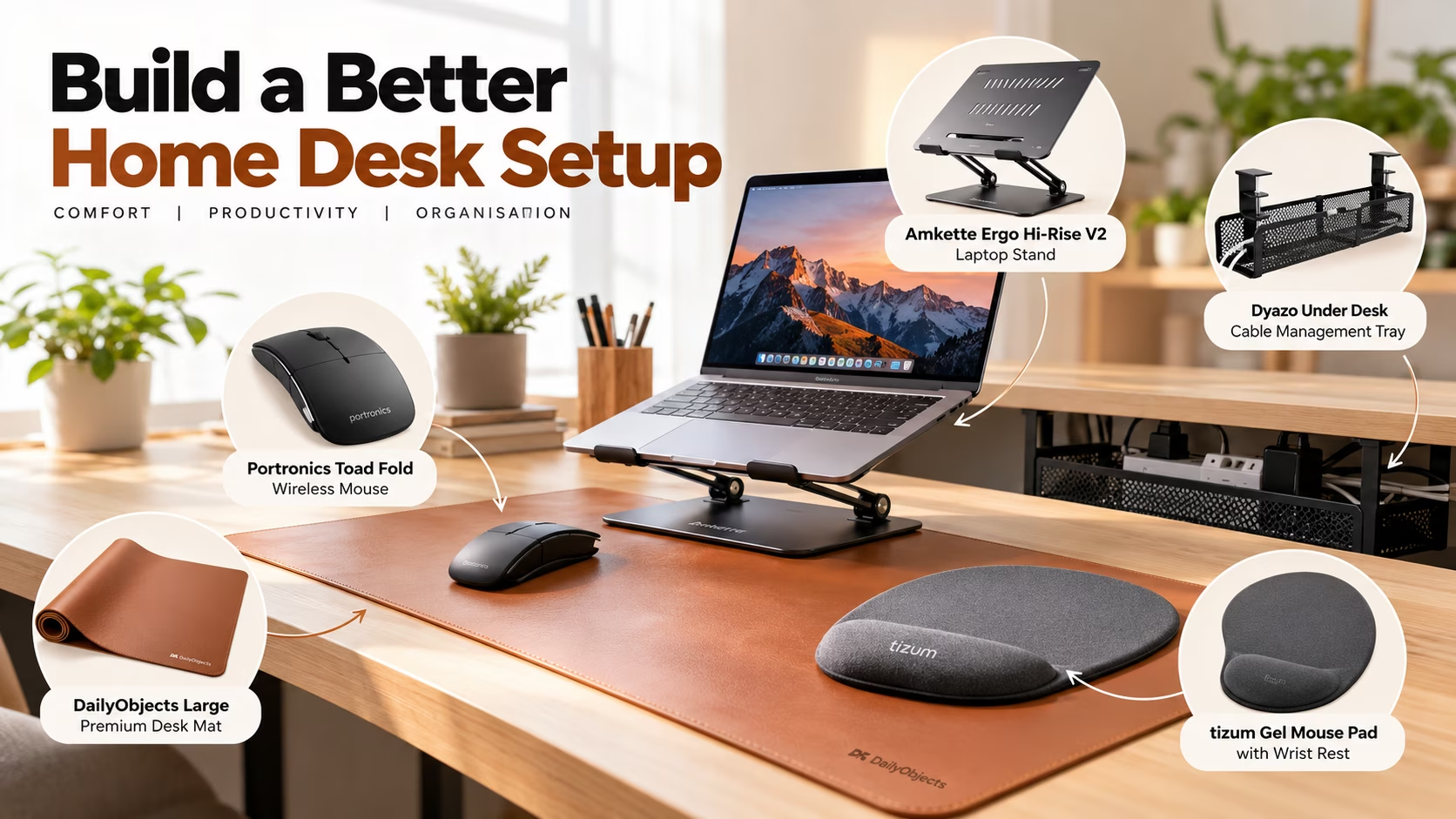
A productive desk does not have to mean an expensive desk. Whether you work from home, study, code, edit documents or manage everyday tasks, a few carefully chosen accessories can make your workspace more organised and pleasant to use. The key is to solve the most noticeable problems first: screen position, mouse comfort, clutter and cable mess.
This guide focuses on practical upgrades available in our product catalogue. You do not need to purchase everything at once. Start with what affects your daily routine, measure your space, and compare the product details before ordering. Prices and availability can change, so check the current listing before making a decision.
1. Start with the screen: Amkette Ergo Hi-Rise V2 Laptop Stand
If your laptop sits flat on the desk, you may find yourself looking down at the screen for long periods. A stand can help raise the display closer to your natural line of sight and create some room underneath for accessories. The Amkette Ergo Hi-Rise V2 Laptop Stand in our catalogue lists adjustable height up to 27 cm, 360-degree rotation, a carbon-steel build and anti-slip EVA pads. The listed load support is up to 5 kg.
Before buying, check your laptop’s size and weight, the stand’s dimensions and whether your desk has enough clearance. If you type directly on the laptop keyboard, a raised stand may make the keyboard less convenient to use; pairing it with an external keyboard can be a better arrangement. A stand is not a substitute for adjusting your chair and desk, but it can help you arrange the screen more thoughtfully.
2. Choose a mouse that fits your work: Portronics Toad Fold
For people who spend much of the day navigating spreadsheets, writing code or switching between browser tabs, a mouse can be a useful upgrade. The Portronics Toad Fold Wireless Bluetooth Mouse is listed with Bluetooth and 2.4 GHz wireless connectivity, a foldable design, a rechargeable battery, multi-device pairing and sensitivity up to 3200 DPI.
Dual connectivity can be handy if you switch between compatible devices, while a foldable body may suit a compact or mobile workstation. Do not choose on specifications alone: consider the shape, hand size, button placement and whether the mouse works with your operating system. If you prefer a conventional shape, compare it against other mice in the catalogue before deciding.
3. Make the desk feel organised with a large mat
A desk mat is a simple way to give a workstation a more intentional layout. It creates a defined area for a keyboard and mouse, can reduce small objects sliding around, and makes the desktop look less visually fragmented. Our catalogue includes the DailyObjects Large Premium Vegan Leather Desk Mat, listed at 85 × 45 cm with a reversible design and anti-skid surface.
Measure the usable desk surface before choosing a mat. Account for the laptop stand, monitor base, notebook, water bottle and anything else that stays on the table. A mat that is too large can crowd a small desk, while a smaller option may be easier to fit into a shared workspace. Keep liquids away from electronics and follow the product’s cleaning guidance to maintain the surface.
4. Tame the cables with an under-desk tray
Loose charging leads and power strips can make even a good desk feel messy. An under-desk tray helps move some of that clutter out of sight and keeps cables from spreading across the work surface. The Dyazo Under Desk Cable Management Tray in our catalogue is described as a no-drill metal mesh rack with clamp mounting, space for power strips and network cables, plus zip ties and cable clips.
Before installing any tray, check your tabletop thickness, the clamp’s clearance and the space available around drawers or support rails. Keep ventilation openings clear, avoid pinching cords, and do not overload a power strip. Route cables with enough slack to move your laptop or peripherals without pulling on connectors. Good cable management is about both neatness and safe access—not hiding every wire at any cost.
5. Consider a wrist-rest mouse pad for comfort
If your mouse hand rests on a hard desk for extended periods, a cushioned pad may be worth considering. The tizum Gel Mouse Pad with Wrist Rest is listed with a memory-foam-style gel cushion and a non-slip rubber base. Its aim is to provide a padded support area while you use the mouse.
Comfort is personal, and a wrist rest will not automatically solve discomfort. The pad should not force your wrist upward or make your hand sit at an awkward angle. Keep your mouse close, relax your shoulders, and take regular movement breaks. If discomfort persists, consider changing your setup and seeking appropriate professional advice rather than relying on an accessory alone.
6. Build your setup in stages
The most cost-effective approach is to identify your main frustration first. If the laptop screen feels too low, prioritise the stand. If pointer control is awkward, compare mice. If the surface looks cluttered, measure for a desk mat. If cables are the main problem, plan the tray installation. Comfort accessories should come after you have considered the basic layout.
You can also improve a desk without buying anything: remove items you rarely use, position frequently used tools within easy reach, keep the screen at a comfortable distance, and give charging cables a consistent route. Take a photo of your current workspace and note what bothers you during a typical work session. That makes it easier to spend only on upgrades that solve real problems.
7. Check the listing details before ordering
Product listings, prices, discounts and stock can change. Confirm the current selling price, seller, return policy, warranty, dimensions and compatibility on the product page. Review the full specifications instead of relying only on a headline or discount percentage. For accessories that support equipment, verify the stated load limits and installation requirements.
Our catalogue offers options for different budgets, but the right choice is the one that fits your workspace and habits. A thoughtful setup is not about having the most gadgets; it is about making everyday work easier, keeping essentials accessible and reducing distractions.
Final thoughts
A better home desk can come together one practical improvement at a time. Start with screen placement, add a mouse or mat only if it solves a real need, and handle cable clutter with a plan. The Amkette laptop stand, Portronics Toad Fold mouse, DailyObjects desk mat, Dyazo cable tray and tizum gel mouse pad featured in this guide are all listed in our product catalogue. Compare their current details, measure before buying and build a workspace that serves the way you work.